Music at an event rarely fails by itself. More often, the moment fails: the
right file disappears among dozens of similar names, the volume is wrong, the
host has already announced the entrance, and the person at the laptop is still
searching through folders.
The Djidaev project now has a tool designed for exactly that situation:
DjidaevPlayer, a browser-based audio player for concerts, theatre,
competitions, celebrations, rehearsals, and live shows.
It is not trying to replace a full studio environment. Its purpose is more
focused: prepare the sound before the event, then press the right button at the
right moment without fighting the software.
A folder full of audio files is not a cue sheet
A conventional music player is excellent for an album or a playlist. A live
event has different needs. There are entrances, jingles, background beds,
complete acts, competitions, pauses, and clips that must begin at a precise
point.
A filename cannot tell you why a track is there, when it should play, what
comes next, or whether its level has already been checked.
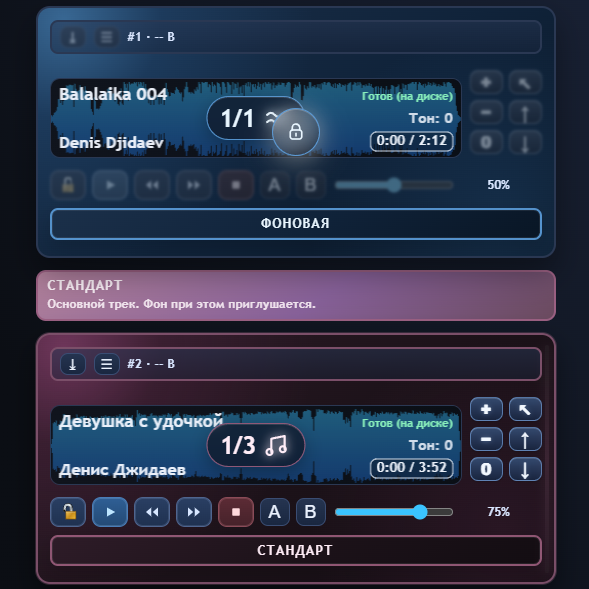
DjidaevPlayer turns a collection of files into a clear audio cue sheet.
Every track becomes a card. Cards can be arranged in working order, given
stage-friendly names, and assigned meaningful roles. Instead of a generic list
of songs, the screen shows the logic of the entire event.
Every track card has a purpose
A card brings together the title, artist, duration, volume, waveform, and
essential playback controls. You can step backward or forward, mark a working
section with A and B points, and lock the waveform against accidental touches.
Roles add context. A jingle, a background bed, a complete music segment, a
short sample, an instrumental version, or pre-show ambience each has a clear
place in the program. The operator does not have to remember what another
cryptic filename was supposed to mean.
That clarity matters most when music, stage action, and a host are all moving
at once. The uneasy thought — “was that really the next track?” — is replaced
by a visible sequence of decisions.
Prepare once instead of rebuilding everything
The completed layout can be saved as a project. A project remembers the
tracks, their order, roles, levels, and card data. It can be loaded again,
exported to a file, or moved to another device.
For recurring formats, you can keep a foundation: one project for a concert,
one for a theatre production, one for children's events, and one for corporate
shows. Before the next date, copy the structure and change only what is new.
DjidaevPlayer accepts MP3, M4A, and AAC. Tracks can come from a computer, a
prepared server folder, or the browser database. For critical work, it makes
sense to open the project in advance and store the required tracks in the
browser database. That leaves you less dependent on a disconnected drive, a
renamed folder, or a lost internet connection.
There is no separate application to install. The player opens in a browser.
Two devices, one working system
Sometimes the sound belongs with one person while the controls belong with
another. A sound engineer's laptop may be connected to the audio system while
the host launches prepared cards from a tablet.
To make this work, both copies of DjidaevPlayer use the same unique key. The
devices then take matching roles:
- Plays and Controls — one device produces the sound while the other
becomes its remote; - Send database and Receive database — prepared tracks and projects
move to another computer; - Broadcast audio and Play audio — the combined audio stream from the
first device is reproduced by the second.
The player does not leave a connection in an ambiguous state. If the second
device cannot be found, synchronization ends and the interface returns to its
normal mode.
Keep the essentials in view
When the main layout contains many cards, a compact mini player keeps only the
title, position, duration, volume, and primary controls in view. It works both
beside the main list and as the principal screen on a remote-control device.
Light and dark themes help the interface fit the room, and the language can be
changed without restarting. But the point is not the number of settings. The
point is that the software asks for less attention, leaving more attention for
the stage.
Who is DjidaevPlayer for?
The player is built around practical live work, so it is useful well beyond a
single profession or genre:
- sound engineers can run a program while seeing the whole set of cues;
- directors and assistants can organize scenes, acts, jingles, and beds;
- hosts can launch prepared clips themselves;
- performers and musicians can keep backing tracks and entrances in a clear
order; - teachers, entertainers, and event teams can avoid a complex studio system
when a fast, understandable tool is what they need.
Important events still deserve a proper check: listen to the opening seconds,
set the levels, confirm the order, and test device synchronization in advance.
DjidaevPlayer does not replace preparation. It makes preparation visible and
helps preserve it when the pressure is on.
Why the player belongs beside Denis Djidaev's music
At djidaev.ru, you can listen to Denis Djidaev's songs, read the
lyrics, and discover new material. DjidaevPlayer serves a different but closely
related purpose: it helps music arrive on time wherever there is a stage, a
program, and a live audience.
These are two sides of the same idea. Music should reach the listener, and
technology should not stand between a person and the moment that matters.
That is why the player is not hidden inside an anonymous side project. It has
become part of the Djidaev world, alongside the songs, stories, and future
musical experiments.
Start with a few tracks
Open the player, add several tracks, assign their roles, and save the first
project. That is enough to feel the difference between a folder of files and a
prepared audio cue sheet.
Music, stage, and timing — under control.